 Windows 10 has been available for free to Windows 7 and 8 users for about five months. Personally, I leapt at the opportunity to upgrade from Windows 7 and I have never before been so profoundly rewarded for my faith in Microsoft.
I have always allowed Microsoft more opportunity than my opinion of the company would prescribe. The Original XBox was the first expensive item I ever saved up my own money to buy; and having several massive LAN parties it created a few fond memories. I owned two different models of the Zune: fun, feature packed devices which, while relying too heavily on a popularity that they would never achieve, lasted me well into the smartphone era. I liked all these things.
However, Microsoft is also responsible for some rather horrendous experiences. The worst cell phone I ever owned was loaded with the  dreadful Windows mobile platform which stuttered and lagged so horribly. I would begin to stammer and twitch alongside the device. They created the disasters Vista and Windows 8, which I endured and avoided respectively and even their most palatable versions of the Windows OS can make software development fairly treacherous and arcane.
With Windows 10 I took a real risk and upgraded very shortly after it became available to me. Bypassing the queue after a little more than two weeks, I was instantly entrenched deep within the Windows ecosystem. The upgrade littered my computer with new and renamed applications tailored to fit this iterations core features (a universal-platforming scheme and a visually-flat theme.) The flood of new programs drove me straight to the start menu ( ), which has returned from beyond the grave like a figure of legend bastardized by its hellish journey. The reincarnated menu is cluttered with an unmanageable slew of folders which are locked in order, a feature which is tediously difficult to customize. I miss the more manageable apps and features found in the start menu of Windows 7 and I worry about the feature loss associated with ‘streamlining,’ however, I now use the search bar (which I discuss more fully below,) to bypass the ‘all apps’ menu; circumventing the issue.
Another key ‘feature’ of Windows 10 is the new Updates suite. For the uninitiated: Windows 10 downloads and installs updates automatically, a “mandatory feature” which can only be disabled in the Pro version. Except that … No: I have the Pro version (or I did, until the Educational edition became available to me through my Alma Mater,) and I CAN’T STOP the updates. It simply grants a small check box which reads: “defer upgrades” which in my experience has had no effect on the daily steam of small to medium sized updates I get delivered to my system, but should in theory stop any larger ‘upgrades’ to the system.

The fact that Windows Update is taking lessons from Mjolnir is troubling and not without consequence. I’m an enthusiast packing two GTX970s SLI bridged together (so much juice Tropicana’s jealous,) so I was relieved to see that Microsoft had reportedly worked with NVIDIA in creating Windows 10 to convince gamers like myself to make the transition (which my hardware demanded, as I mention later.) However, it wasn’t very long before I experienced my first series of computer crashes as a result of conflicting updates from Windows and NVIDIA. While these issues have since resolved themselves, the threat remains a source of unease that accompanies every update; although I remain thankful that when Windows puts out an update it at least intends to improve the machines performance, unlike SOME companies.
So far I am very happy to have upgraded. The foremost reason being that the UEFI/BIOS standards on my motherboard do not appear to have been compatible with windows 7 as the switch solved my problem with regular BSODs that I had traced to the motherboard. Furthermore the latest installment of Windows provides an absolute wealth of features which make casual, gaming, and professional computing easier and more enjoyable.
One of my favorite new features is the improved task bar, with upgraded search that can intuitively find results in user files, applications, settings, and when all else fails: the web; almost
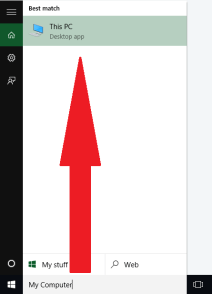
always finding whatever I need. It’s equipped with a sort of intellisense which speeds up search while easing users into the changes made by version 10. Nearby a quick right-click on the Windows Icon () reveals a useful list of the most commonly used services, while the button on the right of the bar ( ) leads to the virtual desktop management page.
The newly introduced virtual desktops are a long overdue feature which allows users to maintain multiple instances of their friendly neighborhood desktop. I really love the desktop, I don’t understand how the iPhone exists without one, and I am constantly using the improved ( +Arrow ) shortcuts to position various windows across my three monitors, then switching to a new desktop and populating each monitor again with the windows for another sub-component of the project.

Unfortunately, even while I praise the redesigned task bar and upgraded search, they give credence to a troubling theory: every product Microsoft has ever produced is part of their evil master plan to make you use Edge(the browser formerly known as Internet Explorer,) or the even more sinister search-engine which shall not be named. You can however subvert their efforts by changing the default browser, and setting the default search engine for Firefox, or installing an extension in Chrome.
Having upgraded from Windows 7 I also benefit from the (few and feeble) improvements found in Windows 8. The boot times are markedly improved, and the Performance Tools associated with the Task Manager (Ctrl+Shift+Esc) are fantastic both functionally and visually. The App store, which I ignore almost completely, appears to be a simplified way of finding and installing common programs and games which should appeal to most users. In the end I’m not sure what’s holding so many people back from upgrading, especially the formidable percentage of computers still using Windows 8.1.

In the end Windows 10 is not without it’s problems. The operating system suffers from flaws in ideology, execution, and design. However these errors are far outweighed by the feature rich, competitively smooth, and heavily customizable modern OS. Whether you’re buying a new machine, or upgrading an old one, I’ve found Windows 10 to be the best software available for personal, professional, and gaming purposes. I’ll have more insight into Windows 10 in the future as I continue to use it on my Desktop and my new Surface Book.
 The Life Programmable